

A clear activity trail
See what happened
Illustration: a running activity log of timestamped agent actions (task planned, files listed, context updated, work completed), with one action marked approval requested.
[ RETURNS RESULTS FOR REVIEW ]
Actionist gives your business AI employees that use your apps, follow your schedules, and return finished work for approval.
Show me what Actionist can automate:
Stage 1 of 7: Request. A request is being composed inside Actionist, with the connected apps it will use.
Learn how my business works, find the repetitive work and show me what you can take on. Ask before anything important


 Connected apps: HubSpot, Gmail, Google Sheets, Google Drive, Slack.
Steer the work. Review the progress. Approve what matters.
Projects selected.
Show me what Actionist can automate:
Meet Actionist
Behind the demo, a quiet stream of workspace moments keeps moving: research and document-review scenes, connected apps, schedules, agent status and task accuracy.
Describe what you want. Actionist turns it into a project, assigns the work, runs it on schedule and returns the result for review.

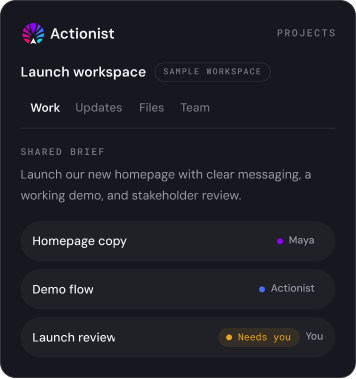


Actionist keeps the brief, work, updates and open decisions together, so teammates can step in with context instead of chasing it.
Actionist breaks the goal into phases, assigns work to AI employees and people, maps dependencies and keeps every approval and result connected.
Your AI employees carry the plan. You own the decisions. Click any task to inspect it; one approval and one connection are waiting on you.
Schedule one-time or recurring work, follow every run and inspect the result without turning the calendar into another meeting tool.
Every run keeps its history and transcript, and every schedule runs in Actionist Cloud, unattended, 24/7.
Watch real conversations, quick stories and videos from the team and community who use Actionist.
Explore more videos, product updates, and stories from the Actionist community.
Decide what runs on its own, what pauses for review, and what always needs a person. Actionist keeps every step visible, permissioned, and secure.
Set the boundaries and rules once, then let your AI employees work independently. Every important action stays visible, reviewable, and protected.
See what happened
Illustration: a running activity log of timestamped agent actions (task planned, files listed, context updated, work completed), with one action marked approval requested.
Keep the final say
Illustration: a four-stage approval sequence: task started, approval required, approved, completed. Task started is complete; approval required is waiting for your review; approved and completed are still to come.
Limit what the agent can access
Illustration: an agent inside a permission boundary. Calendar access is allowed, CRM changes require approval, and Inbox access is not granted. Its connector stops outside the boundary.
Explore practical guides, product knowledge, documentation, tutorials, and the latest improvements from Actionist.
Learn how to create an agent, connect the tools it needs, and prepare its first reusable skill.
GuideStart with a free instant demo, explore Actionist for yourself, or speak with our team about a deployment designed for your business.
Learn how agents, memory, schedules, triggers, channels, and cloud execution work together.
Get answers about setup, security, pricing, deployment, and working with Actionist across your organization.